
Visual Voicemail
Metro by T-MobileBusiness
3.614.91K Reviews
- Version
- 11.5.0.684478
- Installs
- 50.00M
- Age Rating
- Everyone
Screenshots



Our Review of Visual Voicemail
 Analysis by Appyee
When voicemail becomes part of a busy workday, the difficult part is rarely receiving a message. The real problem is deciding when to call back, remembering what the caller said, and avoiding a long chain of interruptions. Visual Voicemail is designed for that narrow but useful job: it gives Metro by T-Mobile customers a more practical way to view and listen to voicemail messages instead of treating the voicemail inbox as something that must be checked blindly by phone.
I see it as a small business tool rather than an all-purpose communication app. It does not replace calls, texts, email, or a task manager. Instead, it sits between an incoming call and the action that follows. Used well, it can help me review messages in batches, identify which calls deserve immediate attention, and turn vague reminders into a manageable callback routine. That makes it especially relevant for people who use one phone for personal responsibilities, appointments, customers, clients, or occasional work.
The app comes from Metro by T-Mobile and is available at no cost. It has been around since August 5, 2014, and its current version is 11.5.0.684478. The broad age rating of Everyone also fits its straightforward purpose. On Android, it requires version 8.0 or later, so anyone using an older device should check compatibility before planning a workflow around it.
How Visual Voicemail fits into a calmer phone workflow
I treat voicemail as a small, separate inbox rather than another reason to interrupt whatever I’m doing. Visual Voicemail can make that routine calmer by letting me choose a message to review, but the real benefit comes from deciding what to do with it afterward. That distinction matters most when missed calls are part of a busy day, so it’s worth looking next at how a deliberate review habit fits into everyday phone use.
Before installing it, identify the actual voicemail problem
My first recommendation is to avoid treating Visual Voicemail as a magic fix for every missed-call problem. If the issue is that I never answer unknown numbers, the app cannot decide whether a caller is trustworthy. If the issue is that I forget appointments, listening to messages alone will not create a reliable calendar habit. Its value appears after a voicemail arrives, when I need a clearer way to inspect it and choose the next step.
The usual alternative is to call a voicemail number, listen to messages in sequence, remember the useful details, and navigate through prompts to save, delete, or replay them. That method still works, but it makes a simple review session feel like a phone call of its own. Visual Voicemail changes the starting point: I can see the available messages and select the one I want to review. For a crowded inbox, that difference is more important than it sounds.
A sustainable setup begins with a simple rule: voicemail is an inbox, not a task list. I listen for the essential facts, then move the required action somewhere I already trust. A request for a quote may become a note, a medical office callback may become a calendar item, and a delivery question may need only a quick reply. Leaving every decision inside the voicemail screen is how missed calls turn into forgotten obligations.
Review messages by urgency instead of by arrival order
One of the most useful habits is to stop listening from the oldest message forward automatically. I first scan the available messages and decide which ones are likely to affect today. A message from a known contact about a time-sensitive change deserves priority over a vague sales call. A message received during a meeting can wait until the meeting ends, while a message connected to a scheduled appointment may need attention sooner.
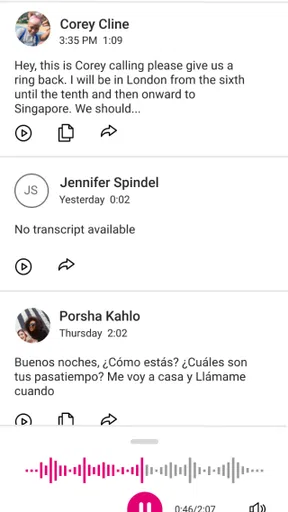
This is where the visual part matters. The app’s store summary focuses on viewing and listening to voicemails, and that basic combination supports a better first decision: which message should I open now? It is a modest improvement, but it reduces the mental load of repeatedly dialing in just to discover that the first message is not relevant.
I would also create a fixed review window rather than checking every missed call immediately. For example, I might review voicemail after the morning rush, once around the middle of the day, and again before finishing work. The exact schedule depends on the person, but the principle is consistent: fewer deliberate checks are easier to maintain than constant phone interruptions.
Turn a message into an action while the context is fresh
Listening is only half the workflow. Right after a message ends, I ask myself three questions: what does this person need, when should I respond, and what information must I have before calling back? This prevents the common mistake of hearing a message clearly but remembering only that a response is needed.
A practical example is a contractor who misses a customer call while working. During the next planned voicemail review, the message may contain a request for availability, a question about an estimate, or a change to an existing appointment. Instead of replaying the message several times later, I would write down the customer’s name, the requested action, and the intended callback time. The app handles message access; my note or calendar handles the commitment.
For a family user, the same approach works differently. A school, clinic, or relative may leave a message that includes a date or a request to bring something. I can listen once, capture the detail in the appropriate place, and avoid using the voicemail inbox as a temporary memory. That separation is a small but meaningful productivity improvement.
Use a repeatable routine rather than depending on memory
The strongest case for this app is not a single feature. It is the routine built around quick review, clear decisions, and cleanup. I would begin by opening the voicemail screen at a predictable time, reviewing the newest or most urgent message first, and immediately recording any follow-up outside the app. Once the action is captured, I can remove the mental pressure to keep replaying the message.
There is also a useful distinction between messages that require a callback and messages that merely provide information. A caller may leave a confirmation that needs no response. Another may ask a question that can be answered by text. A third may require a longer conversation. Treating all three as “call back” creates unnecessary work, while treating all three as “ignore” risks missed responsibilities.
I like to keep the routine deliberately short. The goal is not to spend more time managing voicemail. The goal is to spend less time wondering what is waiting in the inbox. A quick review followed by a concrete next step is more sustainable than building a complicated labeling or note-taking system that I will abandon after a week.
Where the app is genuinely convenient
The main convenience is selective access. Traditional voicemail often encourages a linear experience: call in, listen, wait through prompts, and decide as each message appears. Visual Voicemail gives me a more direct way to choose what to hear. That is particularly helpful when I am in a noisy environment, when several messages have accumulated, or when I need to revisit one specific caller rather than process the entire inbox.
It also supports a better boundary between availability and responsiveness. I can acknowledge that a message arrived without immediately interrupting whatever I am doing. For someone who works in blocks—driving, caring for children, meeting customers, or concentrating on a task—that separation can make the phone feel less demanding.
The app’s scale is another sign that it serves a familiar need. It has more than fifty million installs, around fifty thousand ratings, and an average rating of 3.6. Those figures suggest a widely used utility with a mixed but substantial user experience. I would not interpret the rating as proof that every device or account behaves identically; I would read it as a reason to keep expectations practical. This is a focused carrier voicemail tool, not a polished universal inbox for every communication channel.
Important friction points to understand before relying on it
The first limitation is scope. Visual Voicemail is tied to the Metro by T-Mobile experience, so it makes the most sense for people using that service. Someone who changes carriers, uses several phone numbers, or wants one unified inbox across different providers may find a carrier-specific voicemail app restrictive. In that situation, the phone’s standard voicemail system or a broader communication workflow may be a better fit.
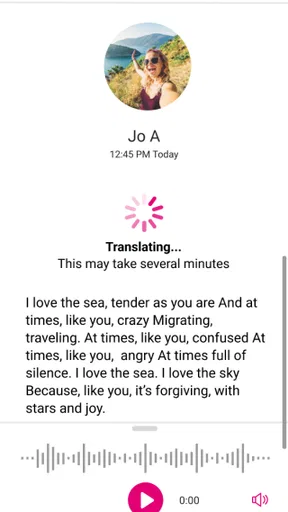
The second limitation is that message review does not automatically solve follow-up. The app can help me access and listen to messages, but I still need to judge urgency, remember context, and complete the callback. Users looking for automatic transcription, advanced customer relationship management, or a combined inbox should not assume that a visual voicemail tool will provide those capabilities simply because it presents messages more clearly.
There is also a behavioral risk. A visible list can create the illusion of organization while the real work remains undone. If I open messages, listen to them, and leave every decision in my head, I have only made the inbox easier to browse. The useful discipline is to connect each important voicemail to an action, a date, or a deliberate decision not to respond.
Finally, compatibility matters. The app requires Android 8.0 or later, and the current release is 11.5.0.684478. That makes it suitable for many relatively recent Android phones, but not every handset still in use. I would check the device before replacing an established voicemail habit, especially if the phone is older or heavily customized.
Small practices that make the experience better
I recommend starting with an empty or nearly empty inbox if possible. That gives me a clean test of how the app fits my day instead of forcing me to process a backlog while learning a new routine. After that, I would use a simple three-way decision: respond now, schedule a response, or archive the thought and move on. The labels can live in my own notes; the important part is making the decision immediately.
Another useful practice is to replay only for verification. If a caller gives a name, number, or time that I did not catch, replaying the relevant message is sensible. Replaying every message repeatedly because I have not captured the next step is less efficient. I would keep a short note ready while listening, particularly for work calls where one missed detail can create another round of messages.
I would also avoid checking voicemail during moments when I cannot act. Listening while rushing between appointments may increase anxiety because I discover tasks without having a place to record them. A planned review period with a note app, calendar, or paper nearby is more reliable. This is an example of the app working as part of a system, not as the entire system.
For people who receive frequent unknown calls, I would add a personal screening rule. A voicemail that contains a clear name, reason, and callback detail can move up the priority list. A message that is empty, vague, or unrelated can wait until the end of the review session. The app makes it easier to inspect the inbox, but the rule protects attention.
Who should adopt it—and who should skip it
I would recommend Visual Voicemail to Metro by T-Mobile customers who regularly miss calls and want a simpler way to choose which messages to hear. It is especially suitable for people who receive a mixture of personal and work calls, anyone who dislikes navigating a traditional voicemail phone tree, and users who want to review messages in batches instead of responding to every interruption.
It is also a sensible choice for a small-business owner or independent worker who does not need a full business phone platform. A missed customer call can be reviewed during a planned break, converted into a callback task, and handled without forcing the person to listen to unrelated messages first. That workflow is basic, but basic can be exactly right when the alternative is disorganized call handling.
I would skip it if I rarely receive voicemail, if I already have a dependable carrier voicemail routine, or if I need features beyond message access and listening. People managing multiple numbers, shared support responsibilities, detailed customer histories, or automatic message processing may be better served by a dedicated business communication service. Likewise, anyone using an Android phone below version 8.0 should not build plans around this installation.
The free price removes one barrier to trying it, but it does not remove the need to evaluate fit. A no-cost app can still add clutter if it duplicates a voicemail method that already works. I would install it when the existing process is causing missed information, wasted time, or repeated calls—not merely because visual organization sounds appealing.
My overall experience with the app’s role
What I appreciate most is its narrow focus. Visual Voicemail does not ask me to redesign every part of communication. It gives voicemail a more inspectable place in the phone and makes it easier to decide what deserves attention. That is enough to improve the transition from “I missed a call” to “I know what I need to do next.”
My reservation is equally clear: the app is only as useful as the routine around it. Without a habit of recording follow-ups, it can become another inbox to check. Without realistic expectations, users may look for transcription, cross-carrier support, or business automation that this focused carrier utility is not meant to replace.
For the right Metro by T-Mobile customer, I think it is worth adopting because it reduces the friction of reviewing voicemail and supports more deliberate phone habits. I would use it as a checkpoint in a larger workflow: review messages at chosen times, capture commitments immediately, and keep the voicemail screen from becoming my memory. The best reason to use Visual Voicemail is not simply hearing messages more conveniently; it is turning missed calls into clear, manageable next actions.
Verdict
Strengths of Visual Voicemail
- Messages can be checked quickly without calling voicemail.
- Shows caller details and voicemail timestamps at a glance.
- Allows users to prioritize important messages more easily.
- Helpful for managing several voicemails during busy periods.
- Can reduce time spent listening to unwanted or outdated messages.
Limitations of Visual Voicemail
- Availability depends heavily on carrier and regional support.
- Some features may require a compatible phone plan.
- Transcription accuracy can vary with accents and background noise.
- Voicemail notifications may be delayed by network issues.
- Setup can be confusing when carrier settings are not detected automatically.
Other Releases by Metro by T-Mobile
View All
myMetro®
Communication4.7
Similar Picks in This Category
View All
LinkedIn: Community & Network
LinkedIn3.8

Zoom Workplace
zoom.com4.1

Microsoft Teams
Microsoft Corporation4.6

Meta Business Suite
Meta Platforms, Inc.4.6

Webex Meetings
Cisco Systems, Inc.4.5

TeamViewer Remote Control
TeamViewer4.4
Frequently Asked Questions
What is Visual Voicemail and how does it work?
Visual Voicemail lets you manage voicemail messages directly from your phone without calling a voicemail number or listening to messages in sequence. After opening the app, you can usually see a list of callers, dates, message lengths, and playback controls. Depending on your carrier and device, you may also be able to pause, rewind, delete, save, or share individual messages.
Is Visual Voicemail free to use?
The application may be free to download, but the service itself can depend on your mobile carrier and plan. Some carriers include Visual Voicemail at no extra cost, while others charge a monthly fee or require a compatible voicemail package. Mobile data charges may also apply when messages are synchronized or downloaded, especially when using cellular data instead of Wi-Fi.
Does Visual Voicemail work with every Android or iPhone?
Compatibility is not universal because Visual Voicemail relies on both the phone and the carrier supporting the feature. Many modern Android phones and iPhones work with it, but availability can vary by country, network, operating-system version, and account type. If the app does not display messages correctly, your carrier may not support the service or may require separate activation.
Can I listen to, save, or share voicemail messages?
In most supported configurations, Visual Voicemail provides convenient playback controls and may allow you to save or share messages through compatible apps. Some versions also offer voicemail transcription, although accuracy can vary with accents, background noise, and recording quality. Saved files may remain accessible only while the service is active, so important messages should be backed up when possible.
Why are my voicemail messages not appearing or updating?
Missing or delayed messages are commonly caused by weak connectivity, disabled mobile data, an incomplete carrier activation, outdated software, or incorrect voicemail settings. Restarting the phone, checking the network connection, and updating the application can help. If the problem continues, contact your carrier because voicemail synchronization is controlled partly by the network, and the app alone may not be able to fix the issue.
